

Appearance
Meet the support specialists #
Choose by the work you need to do. Each persona has a specific area of expertise, so you can go directly to the help you need.
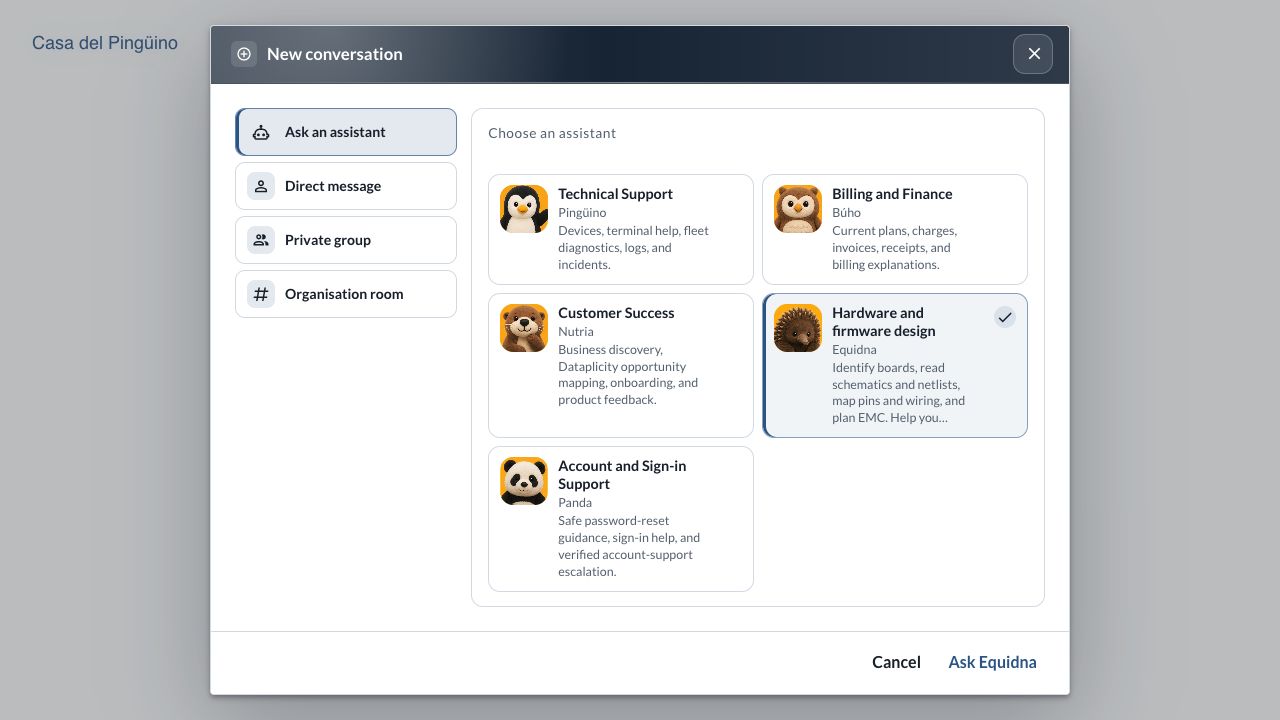
The customer app's specialist chooser, shown with demonstration data. The choices offered to your organisation depend on its plan and enabled specialists.
Who to ask #
| Specialist | Use them for | A useful first question |
|---|---|---|
| Pingüino: technical support | Device and fleet troubleshooting, agent installation, connectivity, terminal help, logs, monitoring and incidents. Can inspect authorised operational evidence and offer supported actions for review. | “This device stopped sending readings after our last release. Help me distinguish connectivity, agent and application failures.” |
| Equidna: hardware and firmware design | Identifying boards, reading schematics and netlists, tracing pins and wiring, planning EMC, and connecting hardware to GPIO, the agent and containers. | “Trace this signal from the sensor connector to the Linux interface, then explain what our container needs to access it.” |
| Nutria: customer success | Understanding your operation, mapping it to Dataplicity capabilities, planning onboarding and rollout, and capturing product feedback. | “We build level monitors. Help us plan the customer views, alerts and maintenance workflow.” |
| Búho: billing and finance | Your current plan, charges, invoices, receipts and billing explanations. | “Explain the charges on our latest invoice and what our current plan includes.” |
| Panda: account and sign-in support | Password-reset guidance, sign-in questions and established account-support processes. | “I cannot sign in. Help me find the correct recovery path.” |
| Águila: sales and account planning | Plan selection, trials, commercial fit and expansion, where offered. | “We expect to deploy 200 devices across several customers. Help us assess the right plan.” |
| Capibara: Free Plan Guide | Getting started with one device, common setup questions and self-service troubleshooting. | “Help me connect my Raspberry Pi and reach the web service running on it.” |
| Suricata: Device Access support | Agent installation, connection troubleshooting and Web CLI guidance for one selected device at a time. | “The agent installation failed. What should I check in this redacted log?” |
| Delfín: mobile app support | Navigation, notifications, sign-in and terminal questions in the native iOS and Android apps. | “My device appears in the browser but I cannot find it in the mobile app.” |
| Human Support | Problems that need a person, further investigation or a support escalation. | “Please have a person review this issue and the evidence we have collected.” |
Equidna provides design guidance. Review a suggested circuit, pin mapping or firmware approach against the exact board and test it on your hardware. Use your schematic and PCB tools to make design changes.
Access by plan #
The table describes the web app. On the native mobile apps, Delfín provides technical help; Pingüino and Equidna are web-only specialists. Open mobile support through Settings → Chat with support → Open help / chat; see the mobile app guide.
| Plan or entry point | Specialists | Team conversations |
|---|---|---|
| Public enquiries before signing in | Dataplicity Concierge provides product, documentation, sales and safe sign-in guidance. Account-specific help requires signing in. | No access to your organisation's conversations. |
| Free | Capibara provides self-service guidance for one device. It cannot inspect account, device or billing data or make changes. | Private assistant help; team messaging is a paid capability. |
| Device Access, where this is your subscription | Suricata, Panda and Búho. Delfín joins the support choices on mobile. Suricata provides install, connection and Web CLI guidance rather than fleet investigation. | Casa del Pingüino is included. The assistants you can invite follow this plan's specialist access. |
| Standard | Pingüino, Equidna, Nutria, Búho and Panda. Delfín provides technical help on mobile. | Casa del Pingüino is included. Operational help follows Standard's included capabilities and your role. |
| Business+ | The paid fleet support specialists, with access to the operational capabilities included in Business+. | Casa del Pingüino is included. |
| Enterprise | Paid support specialists within your organisation's configured capabilities and access policy. | Casa del Pingüino is included. |
Equidna provides hardware and firmware help to the same web-app audience as Pingüino on Standard, Business+ and Enterprise. Águila appears where sales assistance is enabled. Your organisation's access policy also applies. The app's chooser shows the specialists you can use; an assistant invitation does not unlock a feature outside your subscription.
Standard supports everyday device operations. Business+ adds capabilities such as fleet jobs, log analytics, incidents and on-call escalation. See pricing and plan features for the platform comparison.
What can an assistant access or change? #
In a private support conversation, access depends on the specialist, your role and your organisation's capabilities. Pingüino can read permitted operational evidence. Búho works with permitted billing evidence. Nutria uses available product and account context to make recommendations. Capibara and Suricata provide guidance without operating your devices.
Supported changes use the app's review and confirmation controls. Inspect the target, scope and proposed action before approving it, and check the resulting state afterwards. An assistant's explanation alone is not evidence that a command ran or a problem was fixed.
In a team conversation, invited assistants participate under the authority of the person who invited them. Their shared-conversation help is read-only and uses the granted conversation context; it does not run private support actions. See assistant access in Casa del Pingüino.
Usage allowances #
Assistant usage follows your organisation's allowance. The app shows when an allowance is exhausted. Free and Device Access guidance have bounded usage; on paid fleet support, an exhausted AI allowance can continue through Human Support. Check the notice in the conversation for the next available step.
Continue with another specialist or a person #
In a private assistant conversation, ask to switch specialists when the work changes: for example, from product planning with Nutria to device investigation with Pingüino. Review and accept the proposed handoff when it appears. You can also choose Human Support where offered or use Request human support in the conversation. This in-app human-support path is available on Free and paid fleet plans, but is not included on Device Access.
Requesting a person creates a support ticket in the conversation; it does not start a live human chat. Human replies are asynchronous and can take longer. A short problem statement, the relevant time range, what you have already checked and redacted evidence help the team pick up the work. You can also contact support@dataplicity.com.