

Appearance
SSO and SCIM #
SSO is available on every paid plan. You do not need an Enterprise upgrade to use it. SCIM directory provisioning is a separate capability; check billing and current availability before designing automated user or group provisioning.
SSO and SCIM are two jobs. SSO is how people sign in. SCIM is how directory users appear, update, and deactivate. A successful login does not prove provisioning works. A successful SCIM sync does not prove anyone can sign in.
Already know the job? Go directly to Microsoft Entra ID, Okta, or SCIM provisioning. Configure and prove SSO before adding SCIM.
Dataplicity does not create an organisation member from an unknown SAML login. The person must already exist, either as a SCIM-provisioned user or as a local Dataplicity account. Assign the Entra (or Okta) application only to people you intend to land in this organisation.
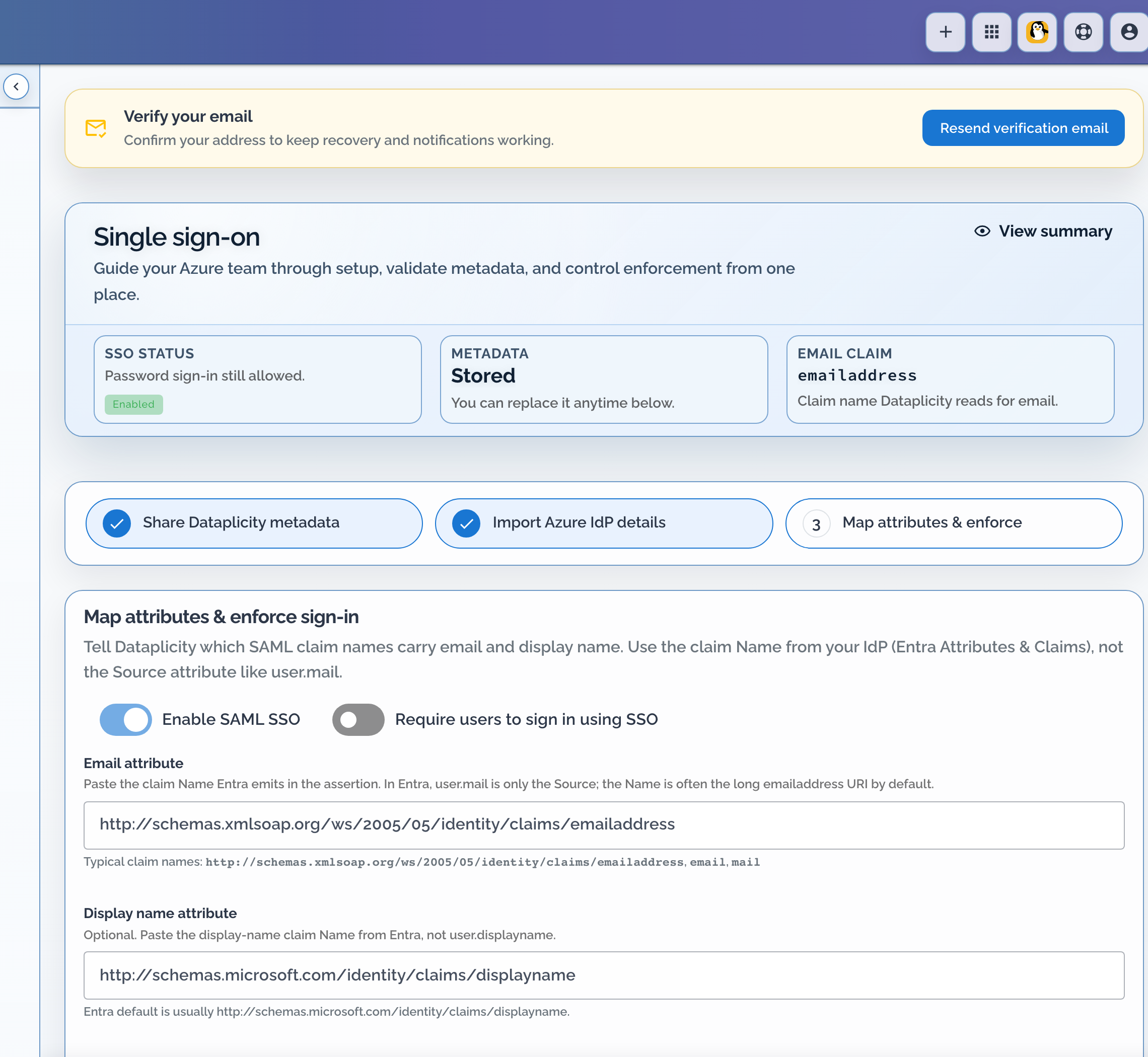
Open the wizard as the Organisation Admin under Configuration → Access & security → Manage SSO. Each organisation has exactly one Organisation Admin. That account is the only Dataplicity identity that can bypass mandatory SSO with password login if the IdP path fails. Day-to-day admin work is better done with the Administrator role; keep Organisation Admin for ownership and break-glass, and do not try to create a second one.
What you are building #
A security operator is deciding four things, in this order:
- Who may sign in with a password after you require SSO. That is the Organisation Admin only.
- How workforce identities arrive. SCIM for people in the directory. Local Dataplicity accounts for people who should not live in that directory (break-glass deputies you keep local, a vendor, a short-lived contractor).
- Where job-function groups live. Dataplicity groups if you are not syncing groups. Identity-provider groups if you turn Sync groups on.
- Whether the IdP may set Dataplicity roles directly. Leave that off unless you have an approved allowlist. Organisation Admin is never accepted from a SCIM role payload.
SSO without SCIM is a valid design: you invite people in Dataplicity, they sign in through the IdP. Add SCIM when joiners and leavers should follow the directory without a second invite step.
Directory users versus local accounts #
When SCIM user sync is on:
| Kind of account | How it is created | What you change in Dataplicity |
|---|---|---|
Directory-managed (scim_managed) | SCIM from the IdP | Read-only. Edit, role, and delete happen in the identity provider. |
| Local | Add user in Dataplicity | You can still add, edit, and delete these accounts. They are not directory-managed. |
The Users page says directory-managed rows are read-only, and that local accounts can still be added and edited. Do not create a local duplicate of a directory user to bypass that. If SCIM later claims the same email, you now have a conflict instead of a workaround.
Local accounts still follow Require users to sign in using SSO like everyone except Organisation Admin. A local user is not a second break-glass password path.
Groups are stricter than users #
Sync users does not lock Dataplicity group management.
Sync groups does:
- You cannot create groups in Dataplicity while group provisioning is enabled.
- SCIM-managed groups stay read-only while SCIM is healthy. Change membership and the group role in the IdP.
If your role set is Dataplicity groups (Support, Engineering, Security), leave Sync groups off and assign SCIM users into those groups in Dataplicity. Turn group sync on only when the directory groups are those job functions.
Recommended rollout #
- Name the Organisation Admin. Give that person a separate Administrator login for daily work.
- Build the role set (groups and tags) before you require SSO.
- Configure SAML. Leave Require users to sign in using SSO off.
- Assign a pilot group in the IdP. At least one pilot user must already be a Dataplicity member.
- Sign in through the IdP in a private window. Confirm organisation, role, and scope. Confirm an unassigned IdP user is denied.
- Confirm the Organisation Admin can still use password login.
- Turn on Require users to sign in using SSO. Re-test a normal SSO login and the Organisation Admin password fallback.
- Enable SCIM. Start with Sync users on, Sync groups off, and Allow Entra to set roles directly off. Provision one pilot user. Confirm they appear as directory-managed and that Add user still creates a local account.
- Only then expand IdP assignment and, if you chose it, group sync.
Work in a private browser window for pilot logins so an existing Dataplicity session does not hide failures.
Dataplicity values to copy #
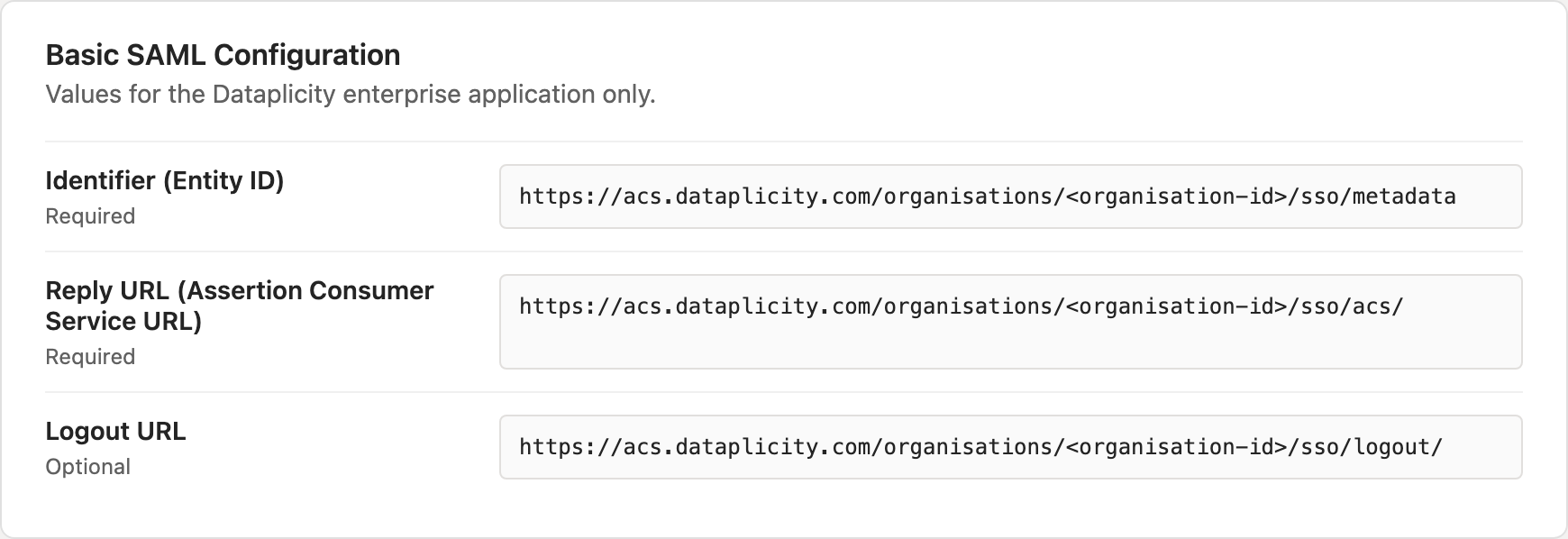
In Manage SSO, Step 1 shows the service-provider values for this organisation. Production SAML and SCIM hosts use acs.dataplicity.com. Prefer those URLs if anything you copy still points elsewhere.
| Dataplicity label | Paste into Microsoft Entra as | Production pattern |
|---|---|---|
| Service provider Entity ID | Identifier (Entity ID) | https://acs.dataplicity.com/organisations/<organisation-id>/sso/metadata |
| Reply URL / ACS | Reply URL (Assertion Consumer Service URL) | https://acs.dataplicity.com/organisations/<organisation-id>/sso/acs/ |
| Logout URL | Logout URL | https://acs.dataplicity.com/organisations/<organisation-id>/sso/logout/ |
Entra rejects Identifier (Entity ID) values that end with /. If Dataplicity shows a trailing slash, omit it in Entra and store the same no-slash value on both sides. You can also Download XML or Copy URL when the IdP can import Dataplicity metadata directly.
Configure SSO with Microsoft Entra ID #
Create the app and assign a pilot group #
In the Microsoft Entra admin center, open Identity → Applications → Enterprise applications, create your own non-gallery application (for example named Dataplicity), then open it.
Before anyone tries to sign in, open Users and groups and assign only the pilot users or group. At least one of those people should already be a Dataplicity organisation member you expect to land after login.
Wire the SAML URLs #
Open Single sign-on, choose SAML, and edit Basic SAML Configuration. Set Identifier (Entity ID), Reply URL (Assertion Consumer Service URL) (HTTP-POST when asked), and Logout URL from the Dataplicity Step 1 values, then save.
Entity ID and ACS must match Dataplicity exactly. Host and trailing-slash mismatches are the usual cause of login loops.
Map claims (Name, not Source) #
Dataplicity matches people on a stable email claim and can optionally read a display name.
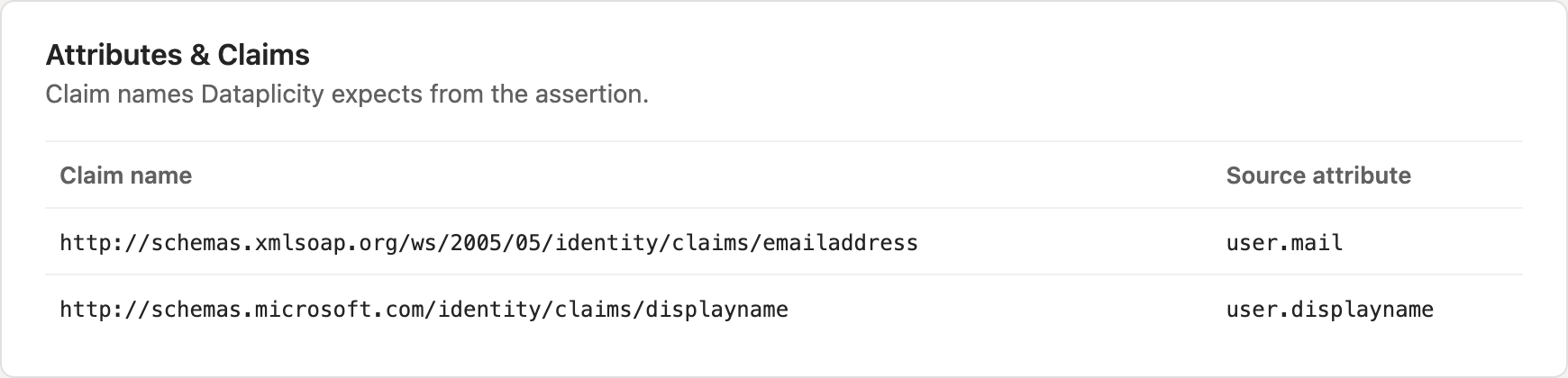
Edit Attributes & Claims on the SAML page. Prefer user.mail as the Entra Source. Use user.userprincipalname only when that value is the email address the person already uses in Dataplicity. Note the claim Name Entra emits - often the long http://schemas.xmlsoap.org/ws/2005/05/identity/claims/emailaddress URI. That Name is what you paste into Dataplicity later; do not paste user.mail into Dataplicity.
Optionally add a display-name claim from user.displayname (Entra often emits http://schemas.microsoft.com/identity/claims/displayname). A claim arriving successfully still does not prove the person has the right Dataplicity role or scope. Check effective access after login.
Export Entra metadata and import it in Dataplicity #
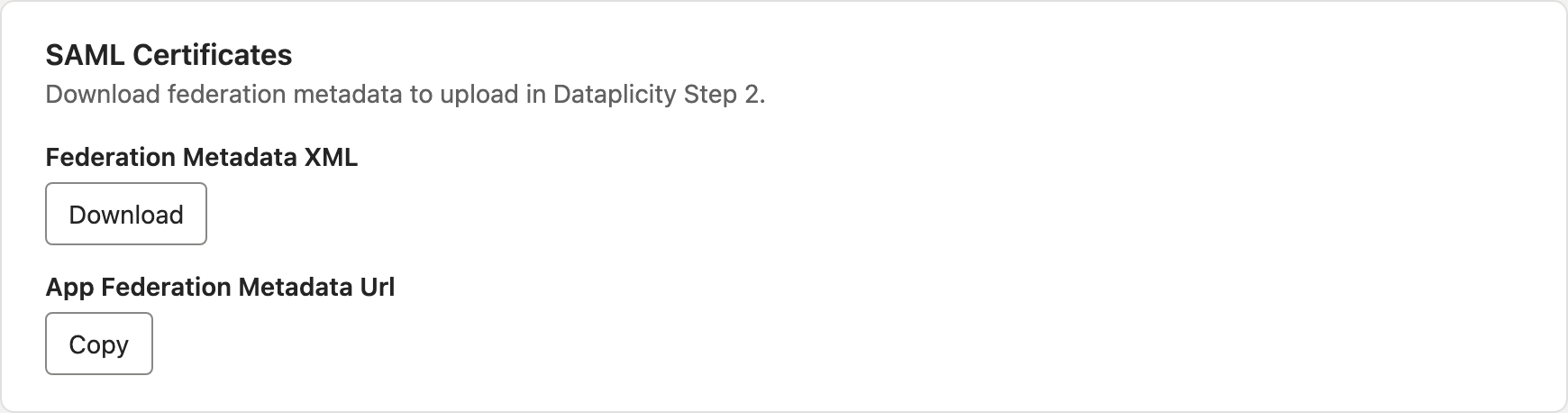
From SAML Certificates, download Federation Metadata XML. Treat signing certificates as secrets; do not paste them into tickets or chat.
Back in Dataplicity Manage SSO, continue to Step 2 · Import IdP details, upload the XML, and confirm Dataplicity shows an IdP SSO URL and certificate fingerprint. If upload is unavailable, paste the IdP login URL and Base64 certificate manually.
Enable SSO for a pilot (do not require it yet) #
Continue to Map attributes & enforce sign-in. Set Email attribute to the SAML claim Name from Entra, and Display name attribute if you configured one. Turn on Enable SAML SSO, leave Require users to sign in using SSO off, and save.
In a private window, open https://www.dataplicity.com/login, sign in as a pilot user through Entra (including MFA), and confirm they land in the right organisation with the right access. Sign out cleanly, then retry with someone who is not assigned in Entra and confirm Dataplicity denies access.
Require SSO #
Only after the pilot works: confirm the Organisation Admin can still use password login when SSO is unavailable. That is the only break-glass path. Turn on Require users to sign in using SSO, save, then re-test a normal SSO login and the Organisation Admin password fallback.
Administrator-role users follow SSO like everyone else. Protect the Organisation Admin account and prefer day-to-day work on Administrator accounts. Verified domains and login hints can help route people to the correct provider.
Configure SSO with Okta #
Use the same Dataplicity Entity ID, ACS, and Logout URL. Create a SAML 2.0 app in Okta, emit an email attribute and note its name, assign a pilot group, download IdP metadata, upload it in Dataplicity Step 2, map the email claim in Step 3, enable SSO, pilot test, then require SSO only when ready.
Provision with SCIM #
Enable SAML SSO first. SCIM keeps directory users (and, if you choose, groups) aligned after login works.
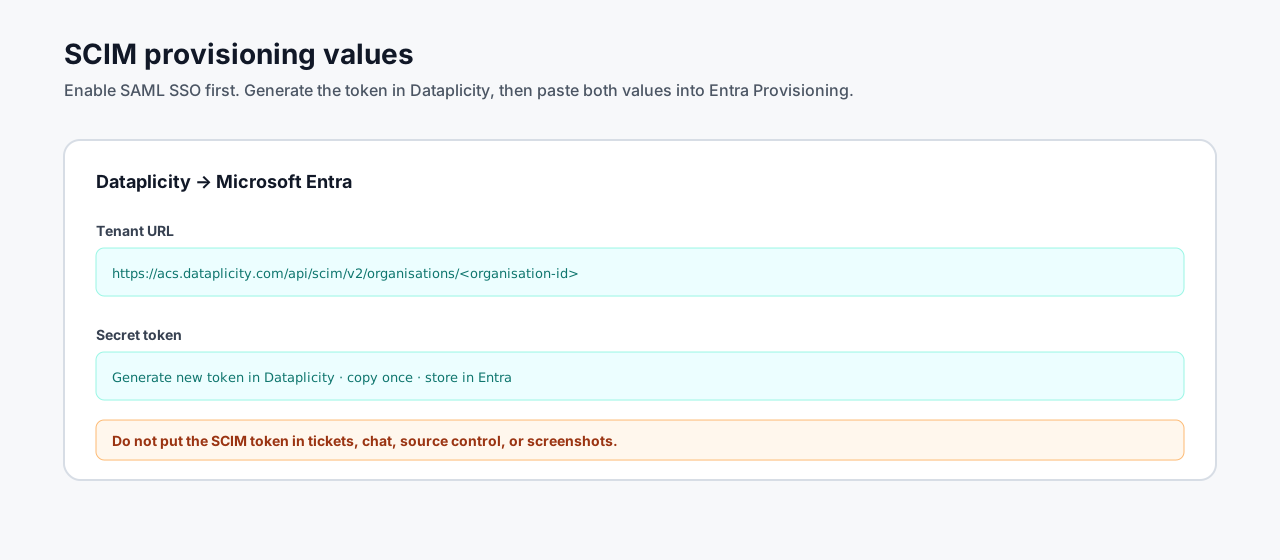
In Dataplicity Manage SSO, open Provisioning (SCIM):
- Enable SCIM provisioning.
- Turn Sync users on.
- Leave Sync groups off unless directory groups are your Dataplicity job-function groups.
- Leave Allow Entra to set roles directly off unless you have an approved role allowlist. Organisation Admin and superuser are never accepted from SCIM role payloads.
- Save, generate a new SCIM token (shown once), and copy the endpoint:
text
https://acs.dataplicity.com/api/scim/v2/organisations/<organisation-id>Treat the token as a secret. Rotate it after exposure, supplier change, or administrator departure. The previous token stops working when you generate a new one.
In the same Entra enterprise application, open Provisioning, set mode to Automatic, paste the Dataplicity endpoint into Tenant URL and the token into Secret token, then Test connection. Configure mappings, start with one pilot user, and confirm in Dataplicity that the user appears as directory-managed, updates when the IdP record changes, and deactivates when removed or disabled in Entra.
Then confirm the other half of the model: Add user still creates a local account, and Edit stays available on that row. Directory-managed rows stay read-only.
Verify before you widen assignment #
| Check | Expected |
|---|---|
| Pilot SSO login | Lands in the right organisation with the intended role and tag scope |
| IdP user not assigned to the app | Denied |
| Unknown email (no Dataplicity member) | Denied. SSO does not create the account |
| Organisation Admin password | Still works after you require SSO |
| Administrator password | Follows SSO; not a break-glass path |
| SCIM pilot user | Appears as directory-managed; Edit and Delete are unavailable in Dataplicity |
| Local Add user | Still creates an editable local account |
| Disable or remove the SCIM user in the IdP | Dataplicity account deactivates or disappears on the next sync |
| Group sync off | You can still create Dataplicity groups and put SCIM users in them |
| Group sync on | In-app group create is disabled; SCIM-managed groups are read-only |
Joiners, movers, and leavers #
- Joiner (directory): add them to the IdP app (and the IdP group that SCIM syncs, if you use group sync). Do not also invite the same email as a local user.
- Joiner (local): use Add user in Dataplicity. Use this for people who should not live in the workforce directory.
- Mover: change IdP group membership or Dataplicity group membership, depending on where that group lives. Confirm they lost the old job's writes.
- Leaver (directory): disable or remove them in the IdP. That is the authoritative deprovision. Then review sessions, API keys, on-call responder devices, and audit history.
- Leaver (local): deactivate or delete them in Dataplicity.
Troubleshooting #
| Symptom | What to check |
|---|---|
| Login loop or SAML error | Entity ID, ACS, host (acs.dataplicity.com), certificate, IdP clock skew, and Entra app assignment |
| SSO succeeds but Dataplicity denies access | The person is not a member yet. Invite locally or wait for SCIM. Then check effective role and scope |
| Wrong organisation after login | Email claim, claimed/verified domain, and which organisation owns that member |
| Email claim missing or wrong user matched | Dataplicity Email attribute versus the claim Name Entra emits; prefer user.mail as Entra Source |
| Cannot edit a user in Dataplicity | Directory-managed users are read-only while SCIM is on. Change them in the IdP. Local accounts remain editable |
| Cannot add a group | Sync groups is on. Create the group in the IdP, or turn group sync off |
| SCIM test connection fails | Endpoint URL, bearer token, and that SAML SSO is already enabled |
| SCIM update rejected | Token rotation, immutable identity fields, and managed-state conflicts |
| Mandatory SSO lockout | Sign in as Organisation Admin with password, turn off required SSO, repair IdP settings |
After certificate or token rotation, re-test a pilot login and one provisioned user.