

Appearance
After devices ship: how Dataplicity connects IoT operations #
Remote access was our beginning. Connected products also need an OEM operating workspace and a customer application joined safely to the same deployed identity.
Operating connected products series
With the network owner's authorisation and permitted outbound HTTPS access, the Dataplicity agent can provide remote access without inbound port forwarding.
That matters. It is also only one moment in the life of a connected product.
Once a unit leaves the bench, the difficult questions become operational:
- Which device is affected, who relies on it, and where is it?
- Is this one bad unit or a pattern across a class, site, or network?
- What evidence does support need before opening a shell?
- Who owns the response, what changed, and how will recovery be verified?
- What can be reviewed and communicated to the customer or site team?
Dataplicity organises those questions around the deployed Linux device. The OEM workspace joins identity, signals, evidence, software, and action. The branded Customer Portal presents the assigned product, location, selected data, and permitted controls without exposing the engineering workspace.
We learned this by running an IoT business #
We built Dataplicity after years of manufacturing connected products ourselves.
We understood the operating costs across cloud infrastructure, design, manufacturing, deployment, and support. More importantly, we saw how a device signal moved through support, engineering escalation, and customer communication.
The recurring problem was rarely the complete absence of a tool. There was already a monitor, a log store, a ticket, a VPN, a spreadsheet, or a status page somewhere. In the stacks we operated, each system held a different fragment:
- Monitoring held the signal, but not always the physical product, customer, or site.
- The service desk held the conversation, but not the live device state or path to access it.
- Remote access held the route to a machine, but not the operational reason for using it.
- Inventory held the unit record, but not the latest field evidence.
Each handoff could lose context, leaving the team to rebuild the same picture during an incident.
Dataplicity was designed from the business process inward. We adopted established patterns where integrating them around IoT device identity could reduce handoffs and improve the end-to-end operating process.
Remote access was the door in #
The original Dataplicity promise remains important: install an agent on a supported Linux device, let it establish an outbound HTTPS connection, and reach it without inbound port forwarding.
That removes the first obstacle. With permitted outbound access, the device can be on a customer network, behind NAT, or at a site where your team does not control the router.
But reachability alone is not an operations model. A terminal cannot tell you whether the problem affects one unit or a fleet cohort. It does not establish support ownership, preserve shared evidence, or decide what customers should see.
The platform grew around that distinction.
One operational loop #
Consider a hypothetical cold-chain fleet during an overnight alert.
A connectivity monitor scoped by device class and site tags detects that the offline ratio has crossed its configured threshold and the minimum impacted-device count has been met. The resulting alert retains its source and resource context. That answers the first question: this is a pattern in a selected cohort, not merely a hostname that stopped responding.
Support can then follow one deliberate path:
- Establish scope. Review the affected devices, class, tags, customer or site, and first-observed time.
- Gather evidence. Search logs for the same resource and time window. Compare a representative device with a healthy peer.
- Choose the least invasive action. Use a known product action or guarded fleet job when it provides target preview and per-device results. Open Remote Shell or Wormhole only when investigation requires interactive access.
- Verify independently. Wait for the monitor to recover and confirm that the service or customer journey is healthy. A successful command is not proof of recovery.
- Close the loop. Review the alert state, incident timeline, fleet-job history, and organisation or device event history. Use the retention or export options available to your organisation for evidence that must be preserved. Turn repeated diagnosis into a monitor, saved query, runbook, or guarded job.
Alerts and incidents have different jobs. Device and fleet connectivity monitors create alerts, not incidents. Use an incident where enabled when acknowledgement, escalation, on-call ownership, or selected public communication is required; see the current monitoring guidance for supported signal types.
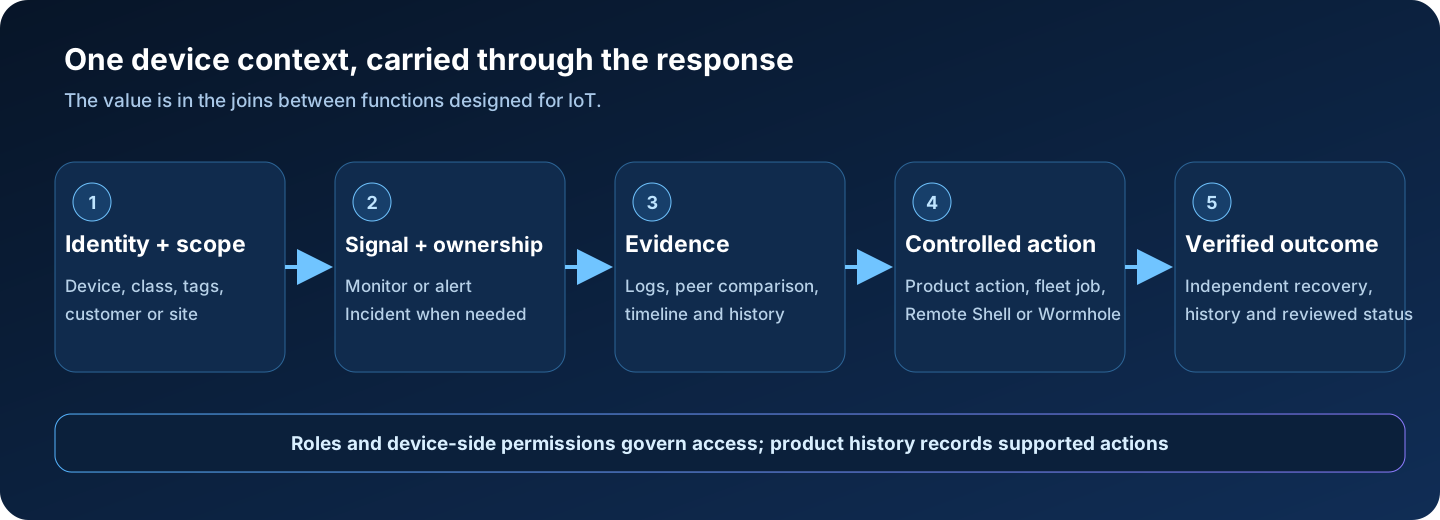
That sequence shows how the platform can reduce handoffs from “something changed” to “we know what happened and what to do next.”
Identity is what makes the joins useful #
A log line without identity is evidence looking for an owner. An alert without class or site context is another page. A shell without a support record is an intervention whose purpose and outcome may be difficult to explain, even when the access event itself is recorded.
The device record gives the operational loop its centre:
- a durable device identity and current connectivity state
- classes and tags for product, site, rollout, and network cohorts
- customer or site records where those modules are enabled
- device-scoped logs and access paths
- identity and time context for reviewing related monitoring, incident, and fleet activity across the platform
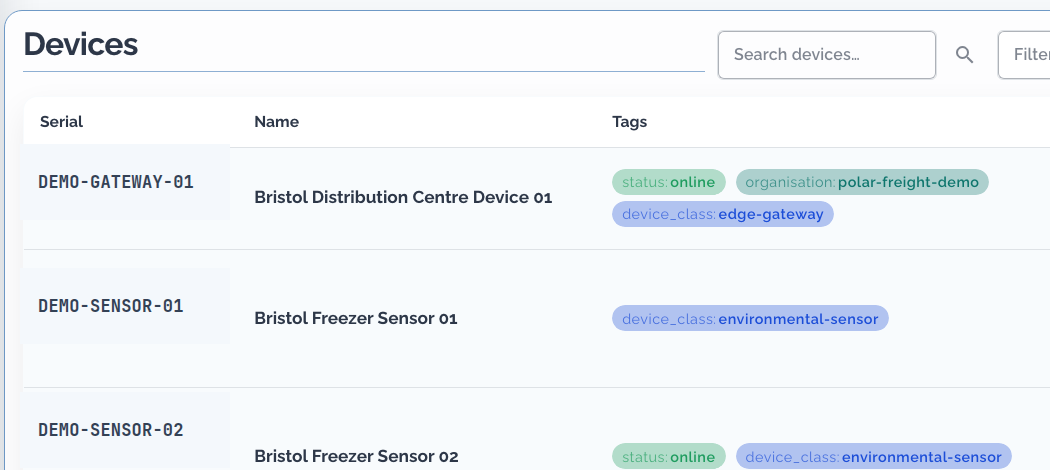
This applies to both businesses Dataplicity serves:
| Connected devices are… | The operational question |
|---|---|
| The product you sell | Can support identify the customer's unit, diagnose routine cases, and escalate to engineering with the relevant device context? |
| Infrastructure your business runs | Can operations see which site assets are affected, give the right people controlled access, and avoid an unnecessary visit? |
The ownership language changes. The operational need does not.
Integration turns functions into an operating process #
The ingredients are familiar: inventory, monitoring, logs, incidents, remote access, scheduled automation, roles, audit, and status communication. Familiarity is useful. Feature count is not the differentiator.
The differentiator is what becomes possible when the boundaries are designed for IoT:
- Identity plus fleet monitoring distinguishes an isolated unit from a class, site, or network pattern.
- Resource context plus logs lets support gather evidence without first reconstructing which machine belongs to whom.
- Evidence plus controlled access makes the shell a deliberate response tool instead of the default starting point.
- Target selection plus fleet jobs turns a repeated command into a bounded operation with preview, progress, and per-device results.
- Incident ownership plus reviewed status information separates the internal response record from what operators choose to publish for customers or stakeholders.
- Individual Dataplicity accounts plus separate device-side permissions and supported access history identify platform actors without sharing a platform login. Commands inherit the agent's effective Linux identity; Wormhole services retain their own application authorisation model.
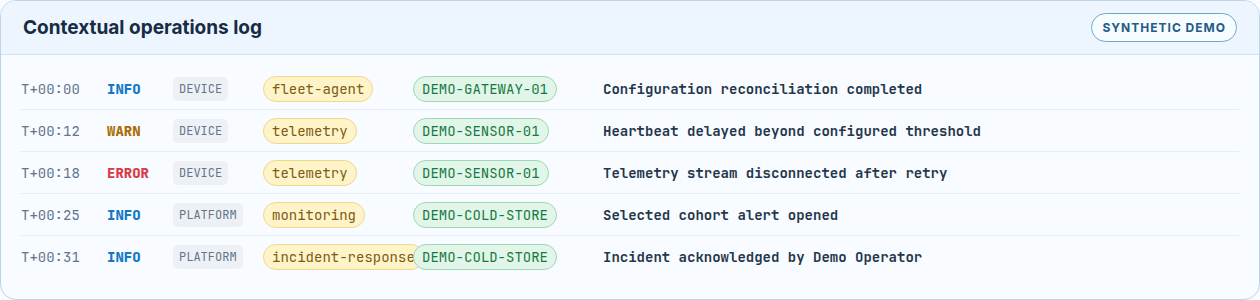
No single item in that list is novel by itself. The operational result comes from their composition around a deployed device.
The boundary is deliberate #
Dataplicity is the device operations layer beside the systems you already run.
Keep your existing application runtime: system services, containers, or your own supervisor. Keep org-wide analytics in the observability platform that serves the rest of the business. Keep full ticket lifecycles in ITSM and corporate network controls in the network stack.
Dataplicity supplies the hosted SaaS around the device: product definition, identity and cohort context, field evidence, controlled response paths, and a separated customer product application where enabled. It does not supply your hardware, Linux distribution, product safety logic, CRM, billing, storefront, commercial contract, or field-service logistics.
Dataplicity beside your existing stack provides the full comparison and system-of-record guidance. When the device itself is the product you sell, continue with the canonical activation guide.
Scheduled HTTP jobs can call external automation on a cron schedule. Fleet jobs handle confirmed commands across selected devices. They remain separate because their control boundaries differ.
The goal is not to recreate every specialist system inside Dataplicity. A capability belongs here when its integration with device identity, field evidence, or response improves an IoT business process.
Trust is part of the operating model #
Remote access to deployed devices is sensitive. The route from evidence to action must include control boundaries:
- The agent initiates an outbound HTTPS connection. Dataplicity does not require an inbound listener.
- Each device authenticates with credentials tied to its identity and account.
- Team members use individual accounts and roles rather than a shared login.
- Platform authorisation and Linux permissions remain separate. A command through Dataplicity does not inherently become a root command.
- Product history records access and supported platform actions where available; coverage and retention depend on the feature and organisation configuration.
- Internal incidents and public status are separate. Operators select and review what is published and must exclude sensitive internal details.
Read Trust on someone else's network before production rollout. It explains the outbound architecture, authentication, roles, and the device-side privilege boundary in detail.
What existing Dataplicity users keep #
If you know Dataplicity as a browser terminal for a Raspberry Pi or another Linux device, that path remains:
- one-line installation on supported Linux images
- browser-based Remote Shell without inbound port forwarding
- Wormhole for reaching a device-hosted web service
- resilient file retrieval where the organisation and agent support it
Remote access is still at the centre of Dataplicity. It is no longer the whole diagram.
After shipping is when operating begins #
Shipping is not the end of the device story. It is the beginning of the operating one.
Dataplicity keeps identity, evidence, and action connected around deployed Linux devices so support has context for routine field work, engineering receives clearer escalations, and customers or site teams can get answers before silence becomes guesswork.
If you already use Dataplicity for remote access, start by organising current devices into classes and tags, then add the monitor and support path that answers your most expensive field question.
If you are evaluating Dataplicity, connect one supported Linux device and, using the capabilities enabled for your organisation, test the path from connectivity state to evidence, controlled access, and independently verified recovery.
Explore the business workflows or read Dataplicity beside your existing stack. For a worked OEM example, see SiloSentry - a fictional grain-bin sensor company walkthrough of fleet records, ops wall, incidents, and fixes (illustrative, not a real customer product).
Continue with One device record from factory to field ticket to follow operational identity through provisioning, ownership, evidence, support, and decommissioning.