

Appearance
Request the evidence now; let connectivity catch up #
Interactive support assumes that a device stays online long enough for a human to use it. Some of the most important field failures break that assumption.
A gateway may connect for seconds each day. A mobile unit may cross coverage intermittently. A failing computer may reboot before a terminal becomes useful. Yet the crash report, rotated log, or diagnostic bundle needed for the case may already exist on disk.
Amber Field Systems lives this pattern every season: farm gateways wake, sample, and drop again. The operator cannot win a live shell race - they request the evidence and let connectivity catch up.
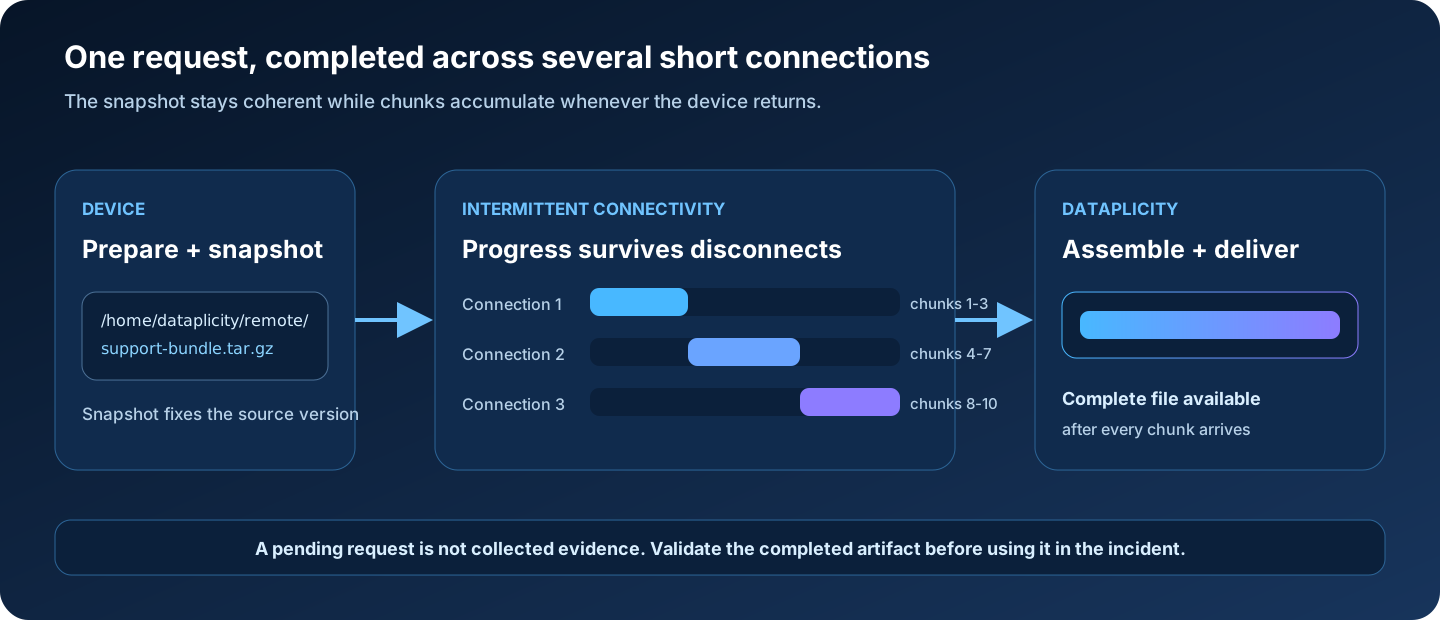
Dataplicity File Transfer lets an operator request a file in advance. The agent snapshots the source and transfers chunks over later connections. Dataplicity assembles the completed file when all chunks arrive.
The operator does not have to win a race against the next disconnect.
Before you design the workflow
Confirm that File Transfer is available for your organisation and production agent release. The guide focuses on the transfer model, evidence preparation, and operating controls that remain important across interface updates.
What changes compared with an interactive transfer #
| Interactive file access | Dataplicity File Transfer |
|---|---|
| Operator and device must be online together | Request can exist while the device is offline |
| One broken session can restart the work | Completed chunks can accumulate across later connections |
| A changing file can produce inconsistent reads | A local snapshot fixes the source version at transfer start |
| Operator navigates arbitrary paths permitted by the session | Files are staged through the indexed remote directory |
| Progress is tied to the live session | Dataplicity assembles the completed artifact after every chunk arrives |
Completion still depends on the device returning, the agent reading the snapshot, and enough total connectivity for every chunk.
The support handoff directory #
File Transfer indexes:
text
/home/dataplicity/remoteDataplicity stores the file index, so an operator can request a previously indexed file even when the device is currently offline.
Treat the directory as an explicit support handoff boundary. It should contain prepared artifacts rather than an uncontrolled view of the filesystem.
Good candidates include:
- rotated application logs
- compressed diagnostic bundles
- crash reports
- bounded database exports
- non-secret configuration summaries
- hardware or environment reports
Avoid:
- private keys
- access tokens
- credential files
- unbounded live databases
- unnecessary customer or personal data
- whole-filesystem archives
Build the artifact for the available network #
The file should be useful enough to answer a question and small enough for the device's expected connectivity.
Suppose a device appears for 30 seconds twice per day. A multi-gigabyte disk image may never become practical. A compressed bundle containing one hour of application logs, agent status, release metadata, and a checksum may complete reliably and answer the incident question.
Define a bundle contract:
text
support-<device>-<UTC timestamp>.tar.gz

manifest.txt
  device hash
  image/release version
  bundle creation time
  included files
  collection errors

application/
  bounded-log-window.txt

system/
  service-status.txt
disk-summary.txtThe exact contents belong to your product. The principle is to make the evidence deliberate, bounded, and explainable.
Snapshot semantics: why an active log can still arrive coherently #
At transfer start, the agent takes a local snapshot of the requested file.
Without a snapshot, a chunk collected on Monday and another collected on Thursday could refer to different versions of an append-only log. Offsets could shift, old data could be rotated away, or the assembled result could mix unrelated moments.
The snapshot fixes the source version while the live application continues writing elsewhere.
For high-value evidence:
- Flush or rotate the application source where supported.
- Collect only the required time window and components.
- Create the bounded artifact in the remote directory.
- Record its creation time, expected size, and checksum where practical.
- Request the indexed file.
- Validate the completed result against the manifest.
File Transfer availability depends on organisation entitlement and agent release. Confirm both before making it part of a production support promise.
Linux permissions remain the real filesystem boundary #
The standard installer runs the interactive agent as the unprivileged dataplicity OS account. Remote file operations inherit that identity's Linux permissions.
Files in /root/ are not normally readable. A user may be authorised to request a file through Dataplicity while the agent is correctly unable to read it on the device.
Prefer copying a specific approved file into the remote directory:
sh
cp /var/log/my-product/app.log.1 /home/dataplicity/remote/For a bundle:
sh
tar -czf /home/dataplicity/remote/support-$(date -u +%Y%m%dT%H%M%SZ).tar.gz \
  /var/log/my-product/app.log.1 \
/etc/my-product/releaseReview the paths and permissions for your image before using an example like this. Do not include credentials or broaden access simply to make collection convenient.
Avoid:
- world-readable permission changes
- broad symlinks into privileged directories
- blanket supplementary groups
- running the whole agent as root for file access
If copying is unsuitable, use a narrowly scoped group or ACL and treat it as a security-sensitive expansion of the agent boundary.
Production pattern: prepare evidence automatically #
The strongest file-request design begins in the product image, not during the incident.
1. Define a bounded collector #
Create a script or application action that:
- collects an explicit set of files and commands
- limits each source by time or size
- writes a manifest
- reports partial collection failures
- avoids secrets by design
- produces one compressed artifact
2. Rotate and cap local evidence #
Keep enough local history for the expected discovery delay, but do not allow the support directory to grow without bounds.
Define:
- maximum artifact size
- maximum number of retained bundles
- creation frequency
- cleanup rule
- free-space guard
3. Test under the actual agent identity #
From the relevant service identity, verify that every intended source can be read and every output can be written. Test on the same image and release used in production.
4. Test the worst supported connection #
Simulate the shortest, least frequent connection the product expects. Confirm that a representative artifact can eventually complete and that cleanup does not remove its source before snapshotting.
5. Document the operator contract #
Support should know:
- how a bundle is named
- when it is generated
- which time window it covers
- what it intentionally excludes
- how to validate it
- when to stop waiting and choose another response
Operator recipe: intermittent cold-chain gateway #
Situation: a gateway reconnects briefly each morning, then disappears. Central logs show repeated telemetry retries but not the local application state around reboot.
- Open the device record and confirm the full hash, release, customer, and site.
- Check the last indexed files in
/home/dataplicity/remote. - Select the support bundle matching the incident window.
- Record the request as pending, including device, file, snapshot time, and expected size.
- Let the transfer accumulate as the device reconnects.
- When complete, validate the archive and manifest.
- Correlate local timestamps with central Logging, monitor state, and last heartbeat.
- Redact sensitive material before sharing.
- Record findings separately from interpretation.
- Verify recovery through telemetry, monitoring, or another independent signal.
A pending request is not collected evidence. Do not write “logs retrieved” until the complete artifact is available and validated.
Choose the right remote-evidence method #
| Situation | Best fit |
|---|---|
| Search structured events across the fleet | Organisation Logging |
| Diagnose interactively while the device is stably online | Remote Shell |
| Browse files through a maintained, authenticated web service | Wormhole file manager |
| Retrieve one prepared artifact across intermittent connections | File Transfer |
| Automate through an external system | A documented Gateway endpoint, where one exists |
File Transfer is currently a browser workflow rather than a documented public Gateway API. Build automation only against published endpoints, not captured private browser calls.
Production checklist #
- [ ] File Transfer entitlement and agent compatibility confirmed
- [ ] Support handoff directory contains only approved artifacts
- [ ] Collector produces bounded output and a useful manifest
- [ ] Rotation, retention, free-space, and cleanup rules tested
- [ ] Read and write access verified under the actual agent identity
- [ ] Representative bundle tested on the worst supported connection
- [ ] Support knows how to name, request, validate, and correlate a bundle
- [ ] Pending requests are not described as collected evidence
- [ ] Sensitive data handling and redaction path documented
- [ ] Remote Shell, Wormhole, Logging, and File Transfer decision points understood
Failure-mode checklist #
File never appears in the index #
- Confirm it exists under
/home/dataplicity/remote. - Check ownership and read permissions under the agent identity.
- Confirm the device and agent have connected since the file was created.
- Confirm File Transfer is available for the organisation and agent release.
Request makes no progress #
- Confirm the device is returning at all.
- Check that the agent can still read the snapshot.
- Compare artifact size with the observed connection budget.
- Review free space and device health.
Completed file does not answer the question #
- Check the bundle's creation and snapshot time.
- Review the manifest for partial collection failures.
- Confirm the source time zone.
- Compare with the correct device hash and release.
- Improve the collector contract before the next incident.
Permission denied #
- Confirm the effective agent identity and groups.
- Copy the specific file into the handoff directory with narrow permissions.
- Avoid widening access across the original directory tree.
Evidence validation checklist #
- [ ] File opens and matches the expected type
- [ ] Size and checksum match the manifest where available
- [ ] Snapshot time overlaps the incident window
- [ ] Device hash and release are recorded
- [ ] Partial collection failures are understood
- [ ] Sensitive content is handled appropriately
- [ ] Findings are compared with central logs and monitor state
- [ ] Recovery is verified independently after any action
Continue the series #
- Logging for a fleet, not a terminal
- Run the fleet from one browser workspace
- Monitor the cohort, not just the device
- Request the evidence now; let connectivity catch up
- Lab: Diagnose the Northstar cold-chain incident